
Choosing Between SaaS, PaaS, and IaaS: What’s Right for You?
In today’s rapidly evolving digital landscape, businesses are constantly seeking ways to optimize their operations, reduce costs, and enhance agility. One of the most significant decisions they face is choosing the right cloud computing model. The three primary options are Software as a Service (SaaS), Platform as a Service (PaaS), and Infrastructure as a Service (IaaS). Each offers distinct advantages and disadvantages, making the selection process crucial to achieving desired business outcomes. Understanding the nuances of each model is the first step towards making an informed decision.
Choosing the wrong cloud service can lead to a host of problems, including unexpected costs, security vulnerabilities, and limitations on scalability and customization. Conversely, selecting the right model can unlock significant benefits, such as increased efficiency, reduced IT overhead, and the ability to focus on core business activities. This article aims to provide a comprehensive overview of SaaS, PaaS, and IaaS, highlighting their key features, benefits, drawbacks, and real-world use cases. By the end, you’ll be equipped with the knowledge necessary to determine which cloud model best aligns with your organization’s specific needs and goals.
Ultimately, the decision of whether to go with SaaS, PaaS, or IaaS isn’t a one-size-fits-all answer. It depends heavily on factors such as your company’s size, technical expertise, budget constraints, and long-term strategic vision. We’ll explore these factors in detail, providing practical guidance and actionable insights to help you navigate the complexities of cloud computing and make the right choice for your business. Let’s dive in and demystify the world of cloud services!
Understanding Software as a Service (SaaS)
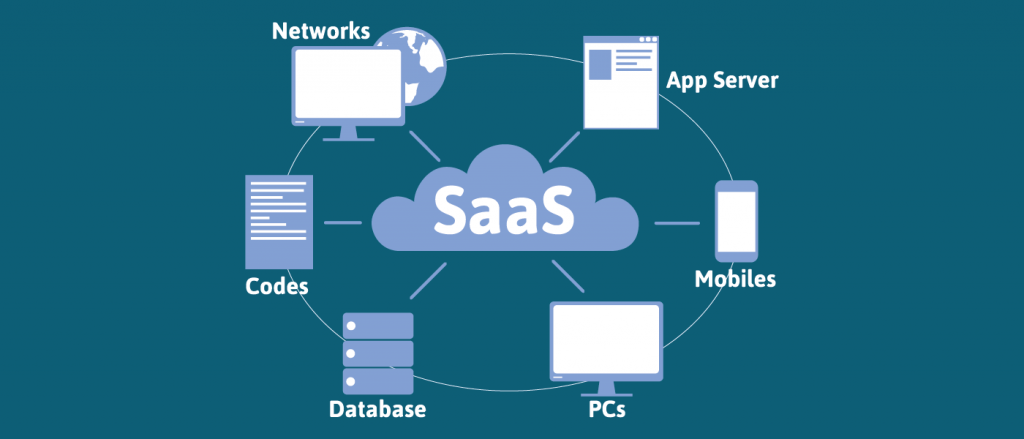
SaaS, or Software as a Service, is a cloud computing model where software applications are hosted by a third-party provider and made available to customers over the internet. Users access the software through a web browser or a dedicated application, without needing to install or manage anything on their own devices. Think of it as renting software instead of buying it outright.
Key Characteristics of SaaS
Here are some defining characteristics of SaaS:
- On-demand availability: Users can access the software anytime, anywhere, with an internet connection.
- Centralized hosting: The software and its associated data are hosted on the provider’s servers.
- Multi-tenant architecture: A single instance of the software serves multiple users or organizations.
- Automatic updates: The provider is responsible for managing updates and maintenance, freeing users from these tasks.
- Subscription-based pricing: Users typically pay a recurring fee, such as monthly or annual subscription.
Benefits of SaaS
SaaS offers several compelling advantages for businesses:
- Reduced IT costs: Eliminates the need for in-house hardware, software licenses, and IT personnel to manage the application.
- Faster deployment: SaaS applications can be deployed quickly, often within hours or days, compared to traditional software installations.
- Scalability: Easily scale up or down the number of users or features as needed.
- Accessibility: Users can access the software from any device with an internet connection.
- Automatic updates: Ensures users always have the latest version of the software with bug fixes and new features.
Drawbacks of SaaS
While SaaS offers numerous benefits, it also has some potential drawbacks:
- Limited customization: SaaS applications may offer limited customization options compared to on-premises software.
- Vendor dependency: Users are reliant on the provider for the availability, performance, and security of the software.
- Data security and privacy concerns: Concerns about data security and privacy when storing sensitive data on a third-party’s servers.
- Integration challenges: Integrating SaaS applications with existing systems can be complex.
- Internet dependency: Requires a reliable internet connection to access the software.
Real-World Examples of SaaS
Many popular applications are delivered as SaaS, including:
- Customer Relationship Management (CRM): Salesforce, HubSpot
- Email Marketing: Mailchimp, Constant Contact
- Office Productivity: Google Workspace, Microsoft 365
- Project Management: Asana, Trello
- Enterprise Resource Planning (ERP): NetSuite, Acumatica
Understanding Platform as a Service (PaaS)
PaaS, or Platform as a Service, provides a complete development and deployment environment in the cloud, enabling developers to build, test, deploy, and manage applications without the need to manage the underlying infrastructure. It’s like renting a complete toolbox and workshop instead of just the tools. For more information, you can refer to cloud as an additional resource.
Key Characteristics of PaaS
Here are the key characteristics of PaaS:
- Complete development environment: Provides all the necessary tools and resources for application development, including programming languages, libraries, frameworks, and databases.
- Scalability and elasticity: Easily scale resources up or down based on demand.
- Support for multiple languages and frameworks: Typically supports a wide range of programming languages and frameworks.
- Simplified deployment: Streamlines the deployment process, allowing developers to focus on coding.
- Collaboration features: Enables collaboration among developers and other stakeholders.
Benefits of PaaS
PaaS offers several benefits for software development teams:
- Faster development cycles: Accelerates the development process by providing pre-built components and tools.
- Reduced operational overhead: Eliminates the need to manage the underlying infrastructure, freeing developers to focus on coding.
- Lower costs: Reduces infrastructure costs and operational expenses.
- Improved collaboration: Facilitates collaboration among developers and other stakeholders.
- Scalability and elasticity: Easily scale resources to meet changing demands.
Drawbacks of PaaS
PaaS also has some potential drawbacks:
- Vendor lock-in: Can be difficult to migrate applications to a different PaaS provider.
- Limited control: Less control over the underlying infrastructure compared to IaaS.
- Security concerns: Concerns about security vulnerabilities in the PaaS platform.
- Integration challenges: Integrating PaaS applications with existing systems can be complex.
- Runtime limitations: May have limitations on the types of applications that can be deployed.
Real-World Examples of PaaS
Popular PaaS providers include:
- AWS Elastic Beanstalk
- Google App Engine
- Microsoft Azure App Service
- Heroku
- Red Hat OpenShift
Understanding Infrastructure as a Service (IaaS)
IaaS, or Infrastructure as a Service, provides access to fundamental computing resources, such as virtual machines, storage, and networks, over the internet. It’s like renting the raw materials and tools to build your own workshop.
Key Characteristics of IaaS
Here are the key characteristics of IaaS:
- On-demand access to resources: Users can provision and access resources as needed.
- Scalability and elasticity: Easily scale resources up or down based on demand.
- Control over the infrastructure: Users have control over the operating systems, storage, and deployed applications.
- Pay-as-you-go pricing: Users only pay for the resources they consume.
- Virtualization technology: Uses virtualization to create virtual machines and other resources.
Benefits of IaaS
IaaS offers several benefits for businesses:
- Cost savings: Reduces capital expenditures on hardware and infrastructure.
- Scalability and flexibility: Easily scale resources to meet changing demands.
- Control and customization: Provides greater control over the infrastructure and the ability to customize it to specific needs.
- Faster deployment: Deploy applications and services quickly.
- Business continuity: Provides built-in disaster recovery and business continuity capabilities.
Drawbacks of IaaS
IaaS also has some potential drawbacks:
- Requires technical expertise: Requires a team with expertise in managing infrastructure.
- Security responsibilities: Users are responsible for securing the infrastructure and applications.
- Ongoing management: Requires ongoing monitoring and maintenance.
- Complexity: Can be complex to manage and configure.
- Potential for hidden costs: Costs can increase if resources are not managed efficiently.
Real-World Examples of IaaS
Popular IaaS providers include:
- Amazon Web Services (AWS)
- Microsoft Azure
- Google Cloud Platform (GCP)
- DigitalOcean
- IBM Cloud
SaaS vs. PaaS vs. IaaS: A Detailed Comparison
To further clarify the differences between SaaS, PaaS, and IaaS, let’s compare them across several key dimensions:
Control
- SaaS: Least control. The provider manages everything from the infrastructure to the application.
- PaaS: Moderate control. You manage the application and data, while the provider manages the infrastructure.
- IaaS: Most control. You manage the operating system, storage, deployed applications, and networking. The provider manages the hardware.
Responsibility
- SaaS: The provider is responsible for everything, including the application, data, runtime, middleware, operating system, virtualization, servers, storage, and networking.
- PaaS: The provider is responsible for the runtime, middleware, operating system, virtualization, servers, storage, and networking. You are responsible for the application and data.
- IaaS: The provider is responsible for the virtualization, servers, storage, and networking. You are responsible for the operating system, middleware, runtime, data, and application.
Use Cases
- SaaS: Ideal for businesses that need ready-to-use applications without the need for customization or management.
- PaaS: Ideal for developers who want to build, test, and deploy applications quickly and easily.
- IaaS: Ideal for businesses that need maximum control over their infrastructure and applications.
Cost
- SaaS: Typically subscription-based, with predictable monthly or annual fees.
- PaaS: Typically pay-as-you-go, with costs based on resource consumption.
- IaaS: Typically pay-as-you-go, with costs based on the amount of resources consumed.
Choosing the Right Cloud Model for Your Business
Selecting the appropriate cloud model is a critical decision that can significantly impact your business’s success. Consider the following factors when making your choice:
Business Requirements
What are your specific business needs? Do you need a ready-to-use application, a development platform, or complete control over your infrastructure? SaaS is great for ready-to-go solutions, PaaS for development agility, and IaaS for maximum control and customization.
Technical Expertise
What is the level of technical expertise within your organization? IaaS requires a team with expertise in managing infrastructure, while SaaS requires minimal technical expertise. PaaS sits in the middle, requiring development skills but less infrastructure management.
Budget
What is your budget? SaaS typically has predictable costs, while PaaS and IaaS costs can vary depending on resource consumption. Consider both upfront and ongoing costs, including the cost of personnel to manage the solution.
Security and Compliance
What are your security and compliance requirements? Ensure that the chosen cloud provider meets your security and compliance standards. Understand who is responsible for which aspects of security in each model.
Scalability and Flexibility
How important is scalability and flexibility? All three models offer scalability, but IaaS provides the most flexibility in terms of customization and control.
Long-Term Strategy
What is your long-term business strategy? Consider how the chosen cloud model will support your future growth and innovation.
Conclusion
Choosing between SaaS, PaaS, and IaaS is a strategic decision that requires careful consideration of your business needs, technical capabilities, budget constraints, and long-term goals. SaaS offers convenience and ease of use, PaaS provides a powerful development platform, and IaaS delivers maximum control and flexibility. By understanding the key characteristics, benefits, and drawbacks of each model, you can make an informed decision that aligns with your organization’s specific requirements. Remember to thoroughly evaluate your options, assess your internal capabilities, and consider your long-term strategic vision before making a final choice. The right cloud model can empower your business to innovate, scale, and succeed in today’s dynamic digital landscape.
Frequently Asked Questions (FAQ) about Choosing Between SaaS, PaaS, and IaaS: What’s Right for You?
When should I choose SaaS (Software as a Service) over PaaS (Platform as a Service) or IaaS (Infrastructure as a Service) for my business?
You should choose SaaS when you need a ready-to-use software application that requires minimal configuration and maintenance. SaaS solutions are ideal when you want to quickly deploy software without worrying about the underlying infrastructure, operating systems, or development platforms. Think of scenarios like using Salesforce for CRM, Google Workspace for productivity tools, or Zoom for video conferencing. SaaS allows you to focus on using the software’s features and functionalities without the burden of IT management. It’s often the best choice for startups and small businesses with limited IT resources or when you need a specific application quickly and efficiently. However, customization options are usually limited in SaaS compared to PaaS or IaaS.
What are the key differences in management responsibilities between using IaaS (Infrastructure as a Service), PaaS (Platform as a Service), and SaaS (Software as a Service) cloud computing models?
The key difference lies in the level of control and management responsibility. With IaaS, you manage the operating system, middleware, runtime, data, and applications. The provider manages the servers, storage, and networking. PaaS offers more abstraction; you manage the applications and data, while the provider handles the operating system, middleware, runtime, servers, storage, and networking. SaaS offers the least control, with the provider managing everything from the application down to the infrastructure. You only manage the user experience and configuration within the application. Choosing between them depends on your desired level of control and the IT resources you have available. IaaS requires the most IT expertise, while SaaS requires the least.
How can I determine if PaaS (Platform as a Service) is a better option than IaaS (Infrastructure as a Service) for developing and deploying my custom software application?
PaaS is a better option than IaaS when you want to focus on developing, running, and managing your software application without the operational overhead of managing servers, operating systems, and infrastructure. If your development team wants to quickly prototype, build, and deploy applications using pre-built tools and services, PaaS can significantly accelerate the process. PaaS also simplifies scaling and managing your application because the platform provider handles the underlying infrastructure. Consider PaaS if you need features like built-in databases, application servers, and development frameworks. However, if you require highly customized infrastructure configurations or have strict compliance requirements that necessitate granular control over the underlying environment, IaaS might be more suitable.


